
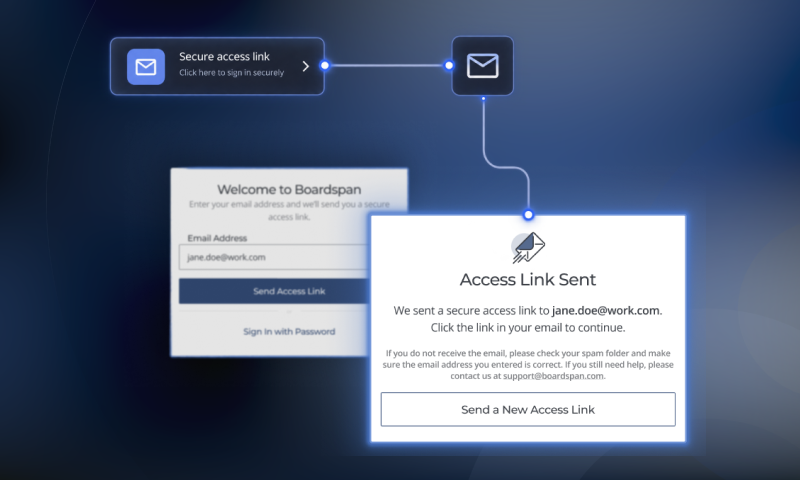
Passwordless Authentication
A redesign for Boardspan’s enterprise authentication experience that reduced support tickets by 80% and increased Magic Link adoption to 89.86% of active users.
As Boardspan's Senior Product Designer, I led the redesign of the platform's authentication experience by introducing passwordless Magic Link sign-in. Working closely with Product, Engineering, and Client Solutions, I simplified login while balancing enterprise security requirements and existing customer workflows.
Outcomes
- Authentication support rate fell from 7.28% pre-launch to 1.45% post-launch, which contributed to an 80% reduction.
- Password reset requests dropped 46% over equal timeframes.
- Magic Link usage accounted for 89.86% of all authentication post-launch.
Business Context
- Typical users log in 1–2x per year
- ~$20K average contract
- Sign-in friction impacts trust & support
- Positive experiences can generate cross-sells
- High-Fidelity Design, Documentation, & Handoff
- Support ticket volume was high
Role
- Research
- Problem Definition
- Solution Exploration
- Mid-Fidelity Prototype and Validation
- High-Fidelity Design & Handoff
- Stakeholder Management
Duration
Feb - Apr, 2026
Product
Boardspan Core
Expanded Context
Boardspan provides governance software, assessments, and advisory services to boards of directors and executive leadership teams.
Unlike most SaaS products, Boardspan's users typically log in only once or twice per year to complete an annual board assessment. The long gaps between sessions meant many users had forgotten their passwords or were unsure which authentication method they had originally used, creating unnecessary friction before they could even begin their assessment.
Because Boardspan serves enterprise organizations with contracts averaging $20,000 USD, every interaction contributes to a customer's perception of the product. A frustrating sign-in experience not only generated support requests, but also risked undermining confidence in the platform and limiting opportunities to expand relationships with directors who serve on multiple boards.
Research
To better understand where users were struggling, I reviewed support tickets, Smartlook session recordings with Product, user feedback from Client Solutions, and the existing authentication flow. While I expected password complexity to be the primary source of friction, the research revealed several unexpected insights.
Users struggled before passwords ever became the issue. Smartlook session recordings showed many users became blocked by common authentication conventions such as placeholder text and other industry-standard sign-in affordances before attempting to enter a password.
Password recovery introduced its own failure point. While forgotten passwords were expected, enterprise email filters frequently blocked password reset emails, leaving users unable to recover their accounts without contacting Client Solutions.
Email was already an established authentication pattern. Many enterprise customers already required email-based two-factor authentication, meaning users were accustomed to returning to their inbox during sign-in. Additionally, every new user was required to verify their account through an email verification process. This suggested that an email-first authentication model could reduce friction without introducing an unfamiliar workflow.
I also built a user journey map to better isolate where pain points were arising. From the early stages of research, it was clear that a standard SaaS sign-in model was creating several high-friction points in the flow.
For instance, provisioned users who access the website directly instead of through the invited link wouldn't know their password, leading to a potential dead end and frustration. This is made even worse if the user attempts to sign up with the provisioned email and is met with an error stating the account already exists.
The Problem Statement
How might we reduce authentication friction for infrequent users without compromising the security standards expected by enterprise customers?
Goals
Primary Goals
- Reduce user friction in authentication processes
- Reduce authentication-related support requests
- Increase user confidence during the first sign-in experience
Secondary Goal
- Minimize engineering complexity and lift
Constraints
Enterprise Security Requirements. Authentication needed to reduce friction while preserving the security standards expected by enterprise customers.
Invitation-First Account Creation. Accounts were provisioned by Boardspan before users ever visited the platform, requiring any authentication changes to work within an invitation-based onboarding model.
Infrequent User Behavior. Most users signed in only once per year, making it unrealistic to rely on remembered passwords or learned familiarity with Boardspan's authentication experience.
Limited Research Access. Boardspan's primary users are corporate board directors, including at Fortune 500 companies, with minimal availability, making moderated usability testing impractical from the outset. Validation had to be designed around proxy participants and the Client Solutions team's direct knowledge of user behavior.
Exploring Solutions
Based on these research findings, I evaluated several authentication patterns used across modern SaaS and enterprise products, weighing each against our goals of reducing friction while preserving enterprise security and fitting within Boardspan's existing onboarding workflow.
SMS-based Authentication
SMS-based authentication would eliminate passwords while maintaining strong security. However, Boardspan did not collect mobile phone numbers for every director, and introducing SMS infrastructure would have significantly increased implementation complexity and ongoing costs.
Improving Password Recovery
Improving password recovery would have addressed email filtering issues, but it did not solve the more fundamental problem: users still needed to remember or recreate complex passwords every year.
Browser Passkeys
Browser passkeys were considered as an emerging authentication model. While promising, adoption was still relatively low, and we felt our infrequent, enterprise user base was unlikely to benefit from introducing an unfamiliar technology.
⭐ Email-Based Magic Links (Selected)
Magic Links eliminated the need for passwords in the primary authentication flow while preserving the enterprise security model. More importantly, many customers already used email-based two-factor authentication, meaning returning to their inbox during sign-in was an established behavior rather than a new one. Instead of asking users to learn a new authentication model, Magic Links simplified one they were already familiar with.
Magic Link Tradeoffs
Magic Links still relied on email delivery and therefore did not eliminate issues caused by aggressive enterprise email filtering. We accepted this tradeoff because email was already a dependency of the existing authentication flow through password resets and optional email-based 2FA. Improving email deliverability would remain a separate initiative, while Magic Links immediately reduced friction for the vast majority of users.
The Tradeoff
Magic Links didn't eliminate our email-filtering risk — they still depended on delivery, same as password resets. We accepted that because email was already load-bearing in the existing flow. The goal wasn't a perfect channel, it was removing the one thing users actually had to remember.
Early Iteration & Cross-Functional Alignment
With the solution direction established, I developed low-fidelity wireframes to model the primary authentication flows for both existing and invited users. Rather than focusing on visual design, these flows served as a shared artifact for Product and Engineering to identify edge cases, validate the authentication architecture, and refine implementation before moving into mid-fidelity designs and internal UX testing.
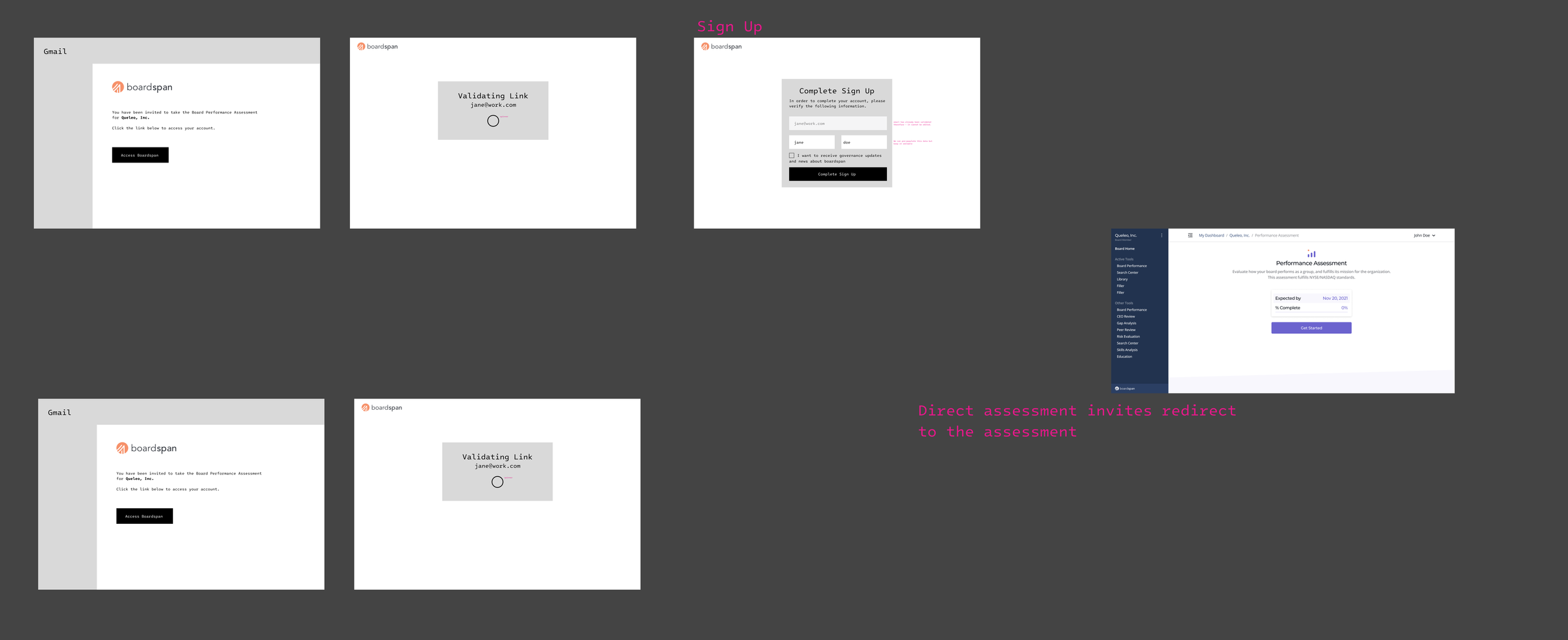
Provisioned User Journey - Magic Link
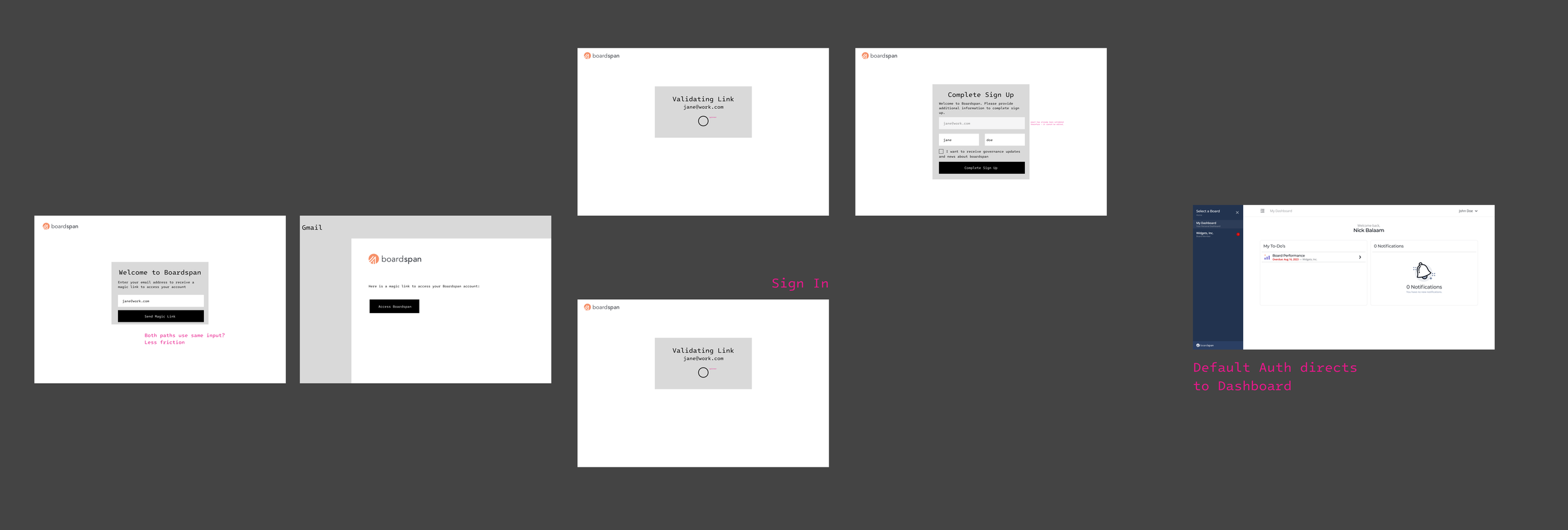
Unprovisioned User Journey - Magic Link
These early flow reviews weren't intended to refine the interface—they were designed to uncover edge cases, validate the authentication architecture, and align with Engineering before investing in high-fidelity designs. Several important design decisions emerged from these conversations:
1. The existing authentication architecture should be preserved
Transitioning to passwordless authentication initially suggested significant backend changes. Through discussions with Engineering, we chose to retain password-based authentication as a fallback, allowing Magic Links to become the primary experience without requiring a fundamental redesign of the existing authentication schema.
Additionally, the Product Manager pointed out that there was a potential for clients to insist on password-based authentication for security purposes. Removing the option to provide it could limit our offerings in terms of security. Because password authentication had always been the default, this requirement had never come up before — it only surfaced once we proposed removing it as an option entirely.
Finally, this also resulted in a discussion about combining all user flow entry points into a single screen. Initially, I had proposed a single email input field for both Sign In and Sign Up, however Engineering’s concern with architecture continued to this point and we agreed to test a multi-screen authentication to limit engineering lift here.
2. We must maintain existing security protections
Because Boardspan experiences automated login attempts, reCAPTCHA remained an important safeguard. We integrated it into the verification process so it appeared only when suspicious activity was detected, preserving security without introducing unnecessary friction for legitimate users.
3. Make backend progress visible
Because the majority of the authentication now happens on the backend, the internal product review further highlighted the importance of strong user feedback while the system validates. This way the user isn’t left wondering whether the system has timed out or failed.
Internal Validation & Iteration
As noted in the constraints, traditional moderated usability testing wasn't practical here. Instead, I combined two internal approaches: partnering with Client Solutions, the team that supports users throughout the assessment lifecycle, and running task-based sessions with internal participants unfamiliar with the product.
Because many Boardspan users access the platform only once per year, participants who were unfamiliar with both the product and common UI patterns served as a reasonable proxy — surfacing confusing interactions without requiring access to enterprise customers.
Approach
Validation combined two complementary perspectives:
Two members of Client Solutions reviewed the redesigned flows against common support requests to ensure they addressed the friction identified during discovery.
Five participants with varying levels of technical familiarity completed common authentication tasks using mid-fidelity prototypes.
Here is the Mid-Fidelity prototype we used for testing. The goal was to have enough fidelity for participants to understand hierarchy, feedback, and transitions while keeping the designs cheap to change…
Key Insights
1. Supporting two authentication methods introduced cognitive load.
Participants initially hesitated when presented with both Magic Link and traditional password authentication. While most understood the distinction after a brief pause, the testing confirmed that Magic Links should remain the primary authentication path, with password authentication de-emphasized as a fallback. In later iterations, the “Use Password” action was reduced from a secondary button to a text link.
2. Simplifying the authentication flow reduced user interaction and the possibility for friction
Once participants entered the Magic Link flow, the remainder of the experience felt intuitive. The loading state and automatic redirect reassured users that authentication was progressing, reinforcing the importance of communicating system status during an otherwise invisible backend process.
3. Testing uncovered an important security edge case.
During walkthroughs with Client Solutions, we identified the need to handle expired Magic Links gracefully. Rather than treating expiration as a dead end, the MVP was updated to allow users to request a new Magic Link directly from the expiration screen, eliminating another potential support request. This, in turn, created a technical edge case whereby a unique magic link would need to be sent that still redirected provisioned users to the appropriate assessment.
What Testing Told Us
- Two auth methods on one screen created hesitation — Magic Link needed to visually lead, password needed to fade
- Once in the Magic Link flow, users didn't get lost — the loading state and auto-redirect did the reassuring
- Expired links needed a way forward, not a dead end — so we let users re-request from the failure state itself
Why We Didn't Test Assessment Invitations
Because this flow reused the same authentication states being validated in the standard sign-in experience, we focused our limited testing resources on the more complex standard flow. Provisioned users always began by clicking a Magic Link from an invitation email before either completing account setup or being authenticated automatically. Once authenticated, they were redirected to the intended assessment.
Additional Design Decisions
We also explored an explicit confirmation step after Magic Link verification. While it reinforced the user's identity, it introduced an unnecessary action immediately after they had already verified ownership of their email address. I gathered buy-in from Product to remove the screen in favor of an automatic redirect, reducing interaction without sacrificing user confidence.
During this iteration, we also chose to label the user-facing Magic Link an ‘Access Link’ as we were concerned the term "Magic Link" lacked enough clarity for our users. Access Link provides a clearer affordance regarding what the link does.
The following gif is the Provisioned, Existing User flow, as this is the primary user journey.
Final Design
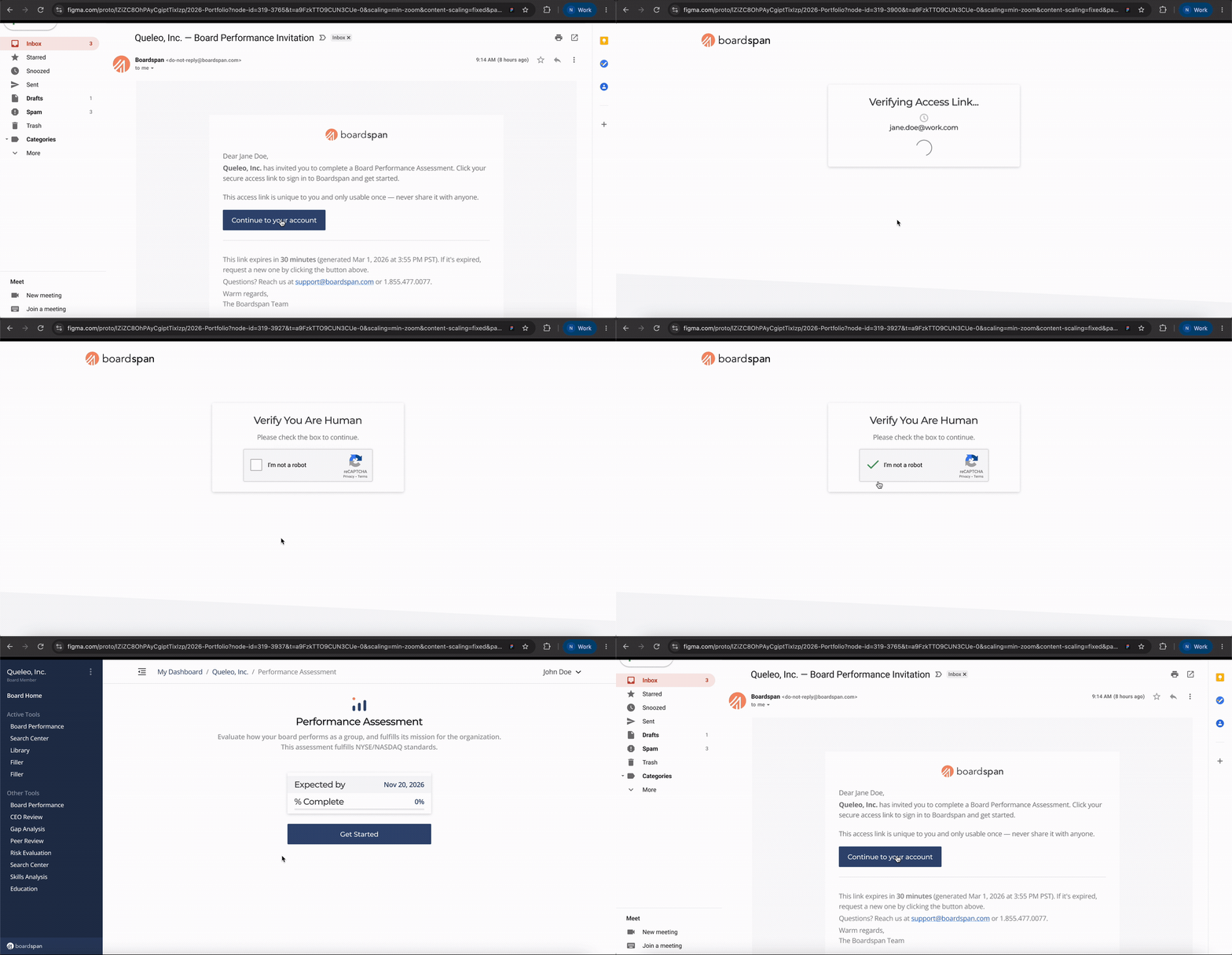
Below are the additional user flows, with repeated states visually de-emphasized after their initial appearance to highlight the unique interactions within each flow.



High-Fidelity Screens
While the overall redesign focused on user flow and interaction, I’ve included a few high-fidelity screens to review for general craft. These designs follow the existing Boardspan design system, which I pioneered and maintain at Boardspan:
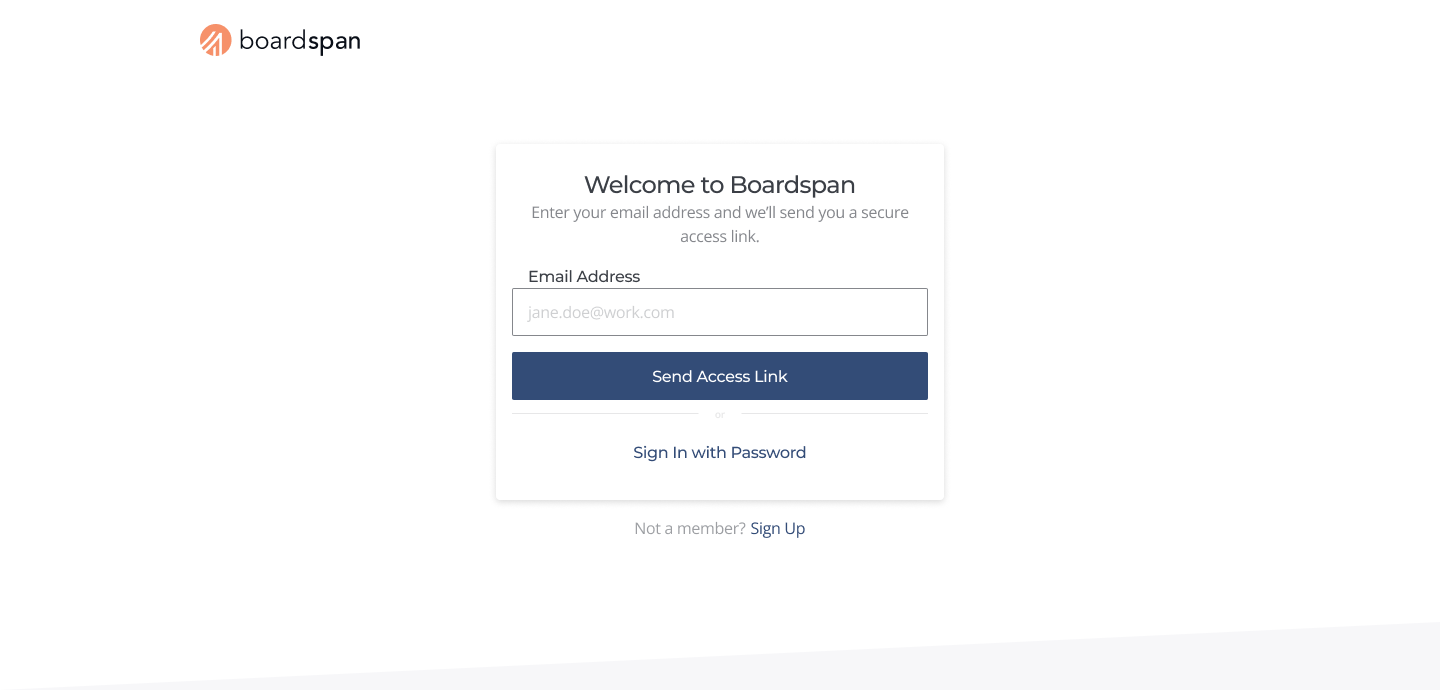
Sign In
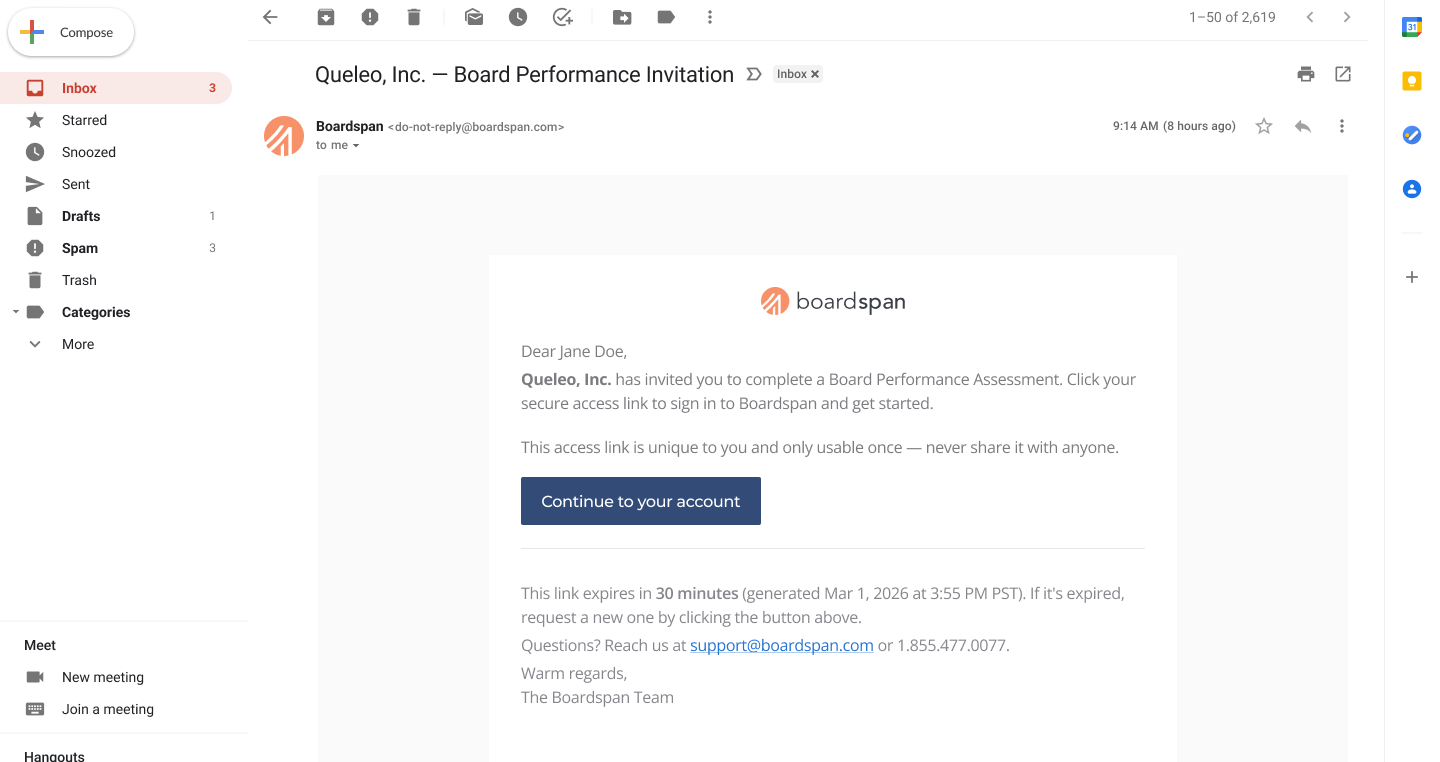
Provisioned User / Email Board Invite
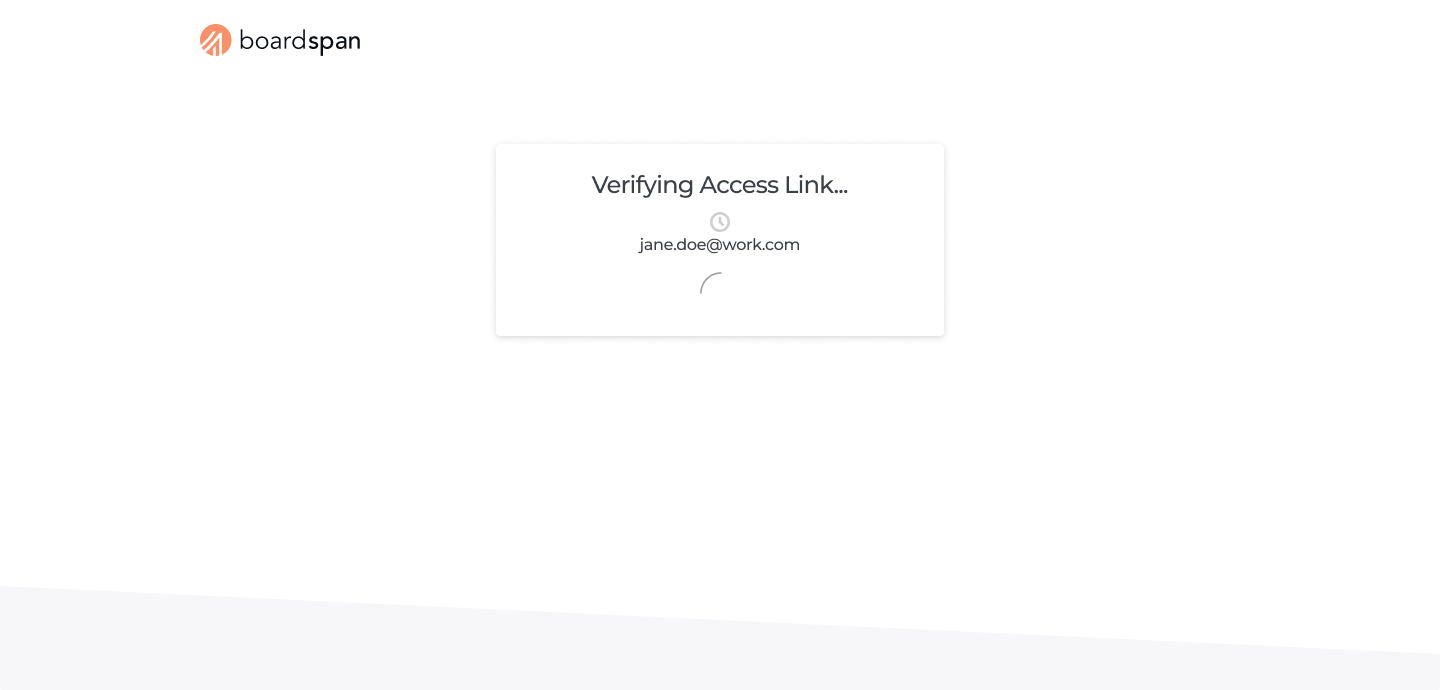
Verifying Feedback Status
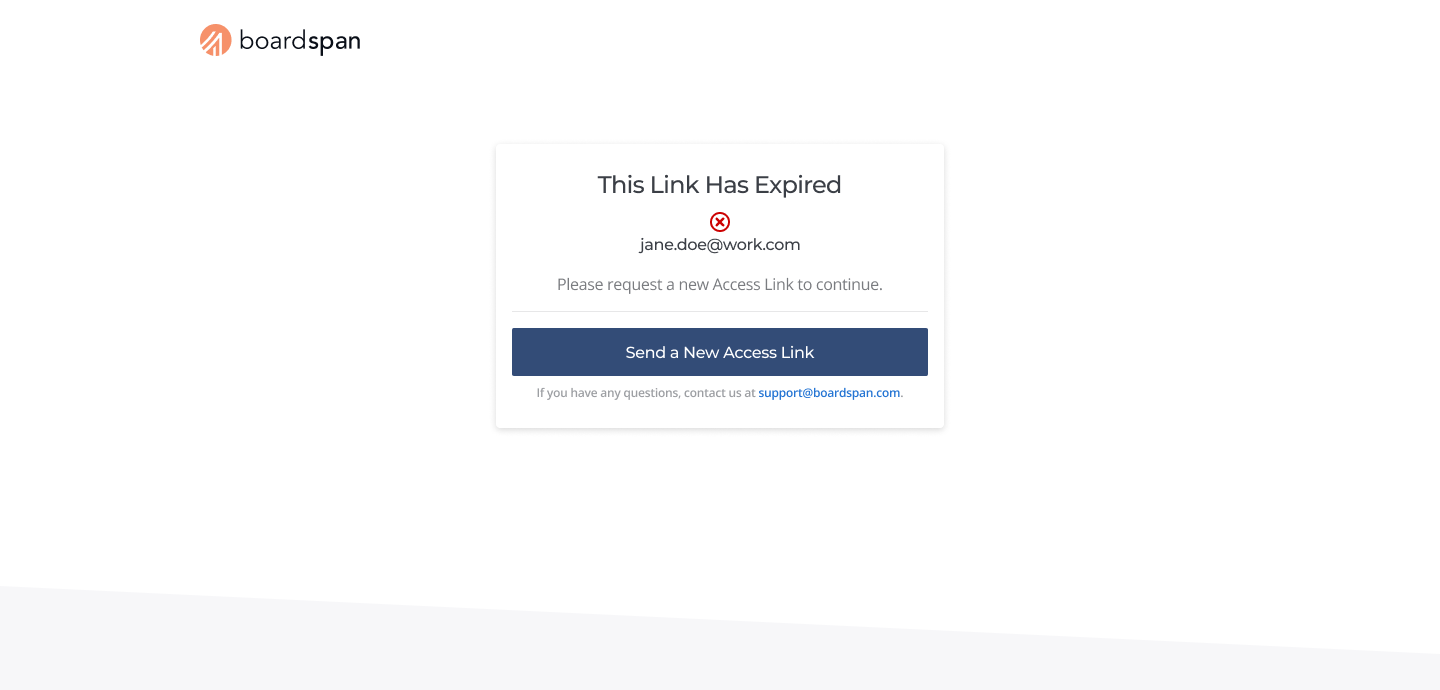
Expired Link State
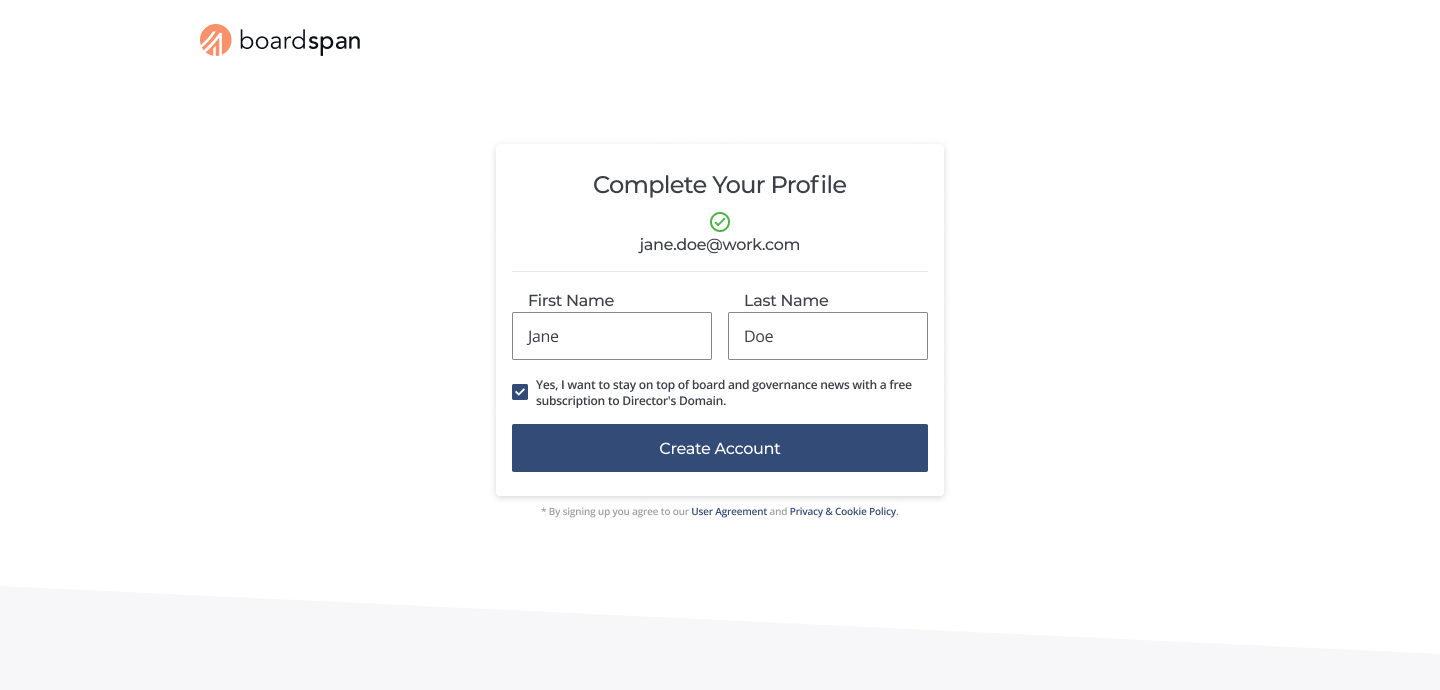
Complete Profile - Note: Provisioned user data is pre-populated with Client Solutions input
Outcome
The redesigned authentication experience replaced Boardspan's password-first workflow with Magic Link authentication while preserving enterprise security requirements and minimizing engineering lift. The final solution reduced unnecessary user decisions, simplified onboarding, and accommodated the different authentication states required across both standard users and assessment participants.
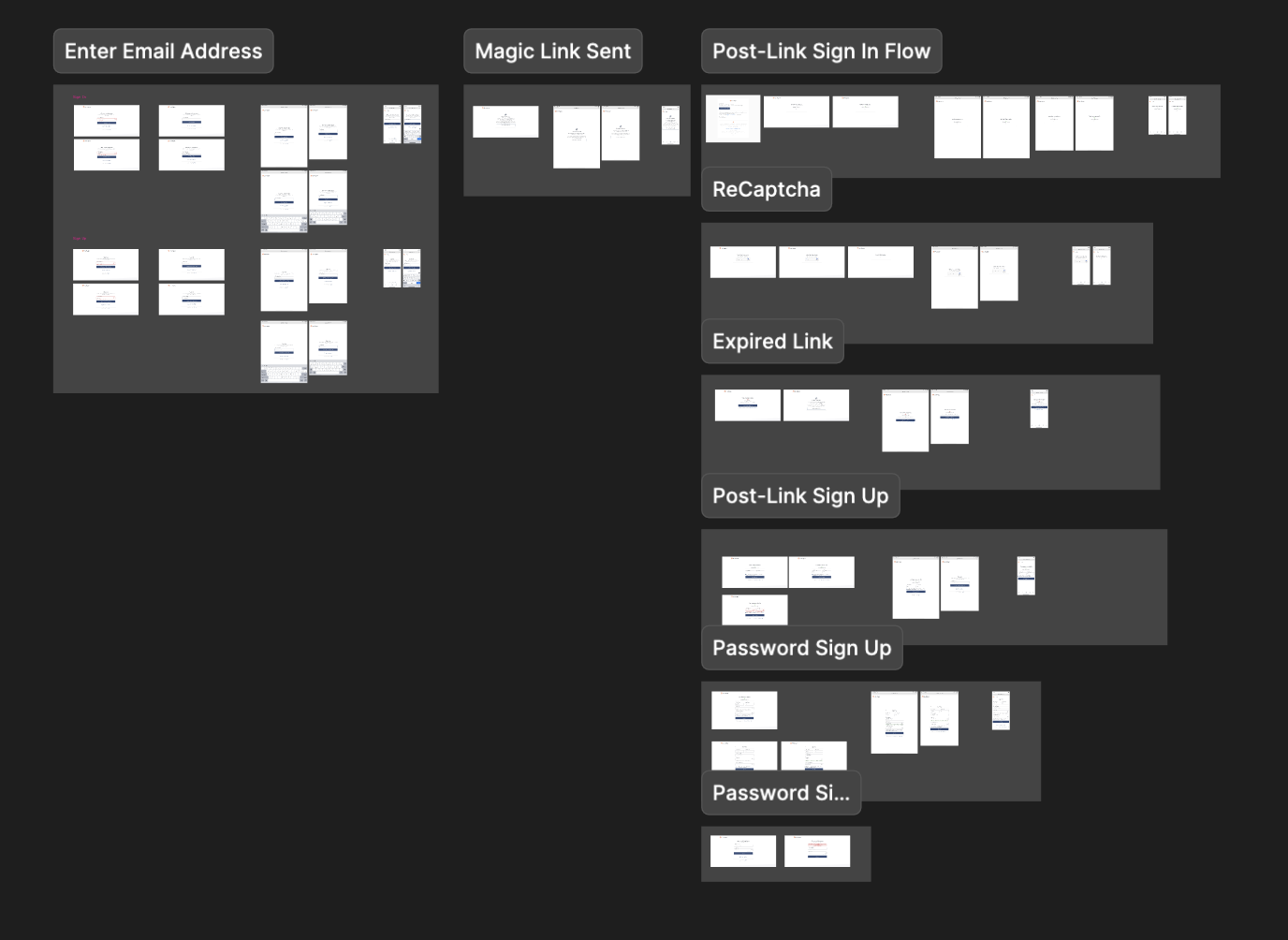
Delivered
Introduced passwordless authentication using Email Magic Links.
Reduced future support friction by handling expired links and authentication edge cases.
Preserved enterprise security and legacy architecture through Recaptcha and fallback password authentication, respectively.
Delivered responsive experiences across desktop, tablet, and mobile, with engineering handoff documentation
Validation Metrics
Support Tickets
Authentication support rate was the clearest success signal for this project. When normalized against authentication volume, authentication-related support fell from 7.28% pre-launch to 1.45% post-launch — an 80% reduction.
Two caveats matter:
First, reducing friction was a broader product goal at Boardspan and Magic Link was one of several initiatives contributing to it, so I wouldn't attribute the full decline to this project alone.
Second, Boardspan's seasonality strongly influences ticket volume: the pre-launch window spans our Q4–Q1 peak, while the post-launch window falls in a quieter period. Normalizing against traffic helps, but this remains an observational pre/post comparison, not a controlled test . A cohort-based rollout would have isolated the effect far more cleanly.
A season-matched read also becomes possible once Q3 2026 closes (against the partial Q3 2025 data available), and Q4 2026 will be the strongest test yet, since Q4 2025 was our highest-volume, highest-friction quarter on record.
The closest comparison currently available, Q3 2025 (3.40%) against post-launch Q2 2026 (1.69%), suggests roughly a 50% reduction. Both windows are partial and the post-launch numerator is small enough that a single ticket meaningfully shifts the rate, so I'd treat this as directional rather than definitive.
A Note on Rigor
These numbers are directional, not causal. Ticket volume is seasonal, Magic Link adoption is measured by design (not preference), and this was an observational pre/post comparison — not a controlled test. I'm flagging that on purpose: knowing what a metric can't tell you is part of the job.
Adoption
Additionally, we were able to measure Magic Link adoption through a backend flag that tracked the authentication method used. Because Magic Links authenticate users automatically after link verification, the data naturally favors the new experience and should not be interpreted as a direct user preference. Even with that caveat, the results demonstrate that Magic Links became the dominant authentication path following launch.
Password Reset Requests
Finally, using reset password logs, we determined that password reset requests fell 46% following launch. Raw password-reset requests declined from 15 to 3 across matched ~100-day periods. Because the pre-launch period had higher authentication volume, I normalized the comparison against unique authenticating users.
Each data point carries its own confounding variables, however the consistency across adoption, password recovery, and support signals suggests the new authentication experience is successfully reducing a recurring source of user friction.
Reflection
While the project achieved its primary goals, reflecting on the process revealed several opportunities to strengthen how I would validate, roll out, and measure a similar solution in the future.
With fewer constraints around user testing, I would have conducted a round of unmoderated testing to observe users experiencing the authentication flow firsthand. I would frame the test around completing an assessment, allowing me to evaluate the authentication experience in context without making it the explicit focus. Observing how users interacted with the new patterns would have helped identify where the flow succeeded and where further iteration was needed.
I would also work with Product and Engineering to explore a cohort-based rollout, beginning with users we identified as more tolerant of novel UI patterns. This would have allowed us to validate the new experience in production before expanding it more broadly.
Finally, I would have established more robust tracking around authentication from the outset. The data available after launch was useful, but more complete historical records would have made the pre- and post-launch comparison stronger.
Although the project itself has concluded, I plan to continue measuring the redesign’s impact over the coming quarters, particularly as Boardspan enters its busiest period from Q4 through Q1. This would provide a larger sample and help determine whether the improvements observed after launch continue under heavier usage.
Follow-Up Work
Improve email deliverability. Address enterprise email filtering issues to reduce the remaining risk of Magic Link and authentication emails being delayed or blocked.
Merge Sign In & Sign Up screens. Once Magic Links are sufficiently validated, consolidate the remaining Sign In and Sign Up entry points into a single email address input field, whereby enterprise clients that specifically request additional security can have provisioned users provide passwords in a branching flow.